GEAR
What You Need
🎙️
Plug in FIFINE K669B USB Microphone - a simple, portable, and easy to use Condenser Microphone!
🎧
Plug in Apple EarPods (3.5mm) for monitoring
🔊
Farrago - soundboard for sound effects ($29)
🔀
Loopback - audio routing to combine mic + Farrago into one input ($99)
📹
StreamYard - recording studio in the browser (free tier works)
✂️
Audacity - audio editor for trimming and exporting (free)
PHASE 1
Setup
1.
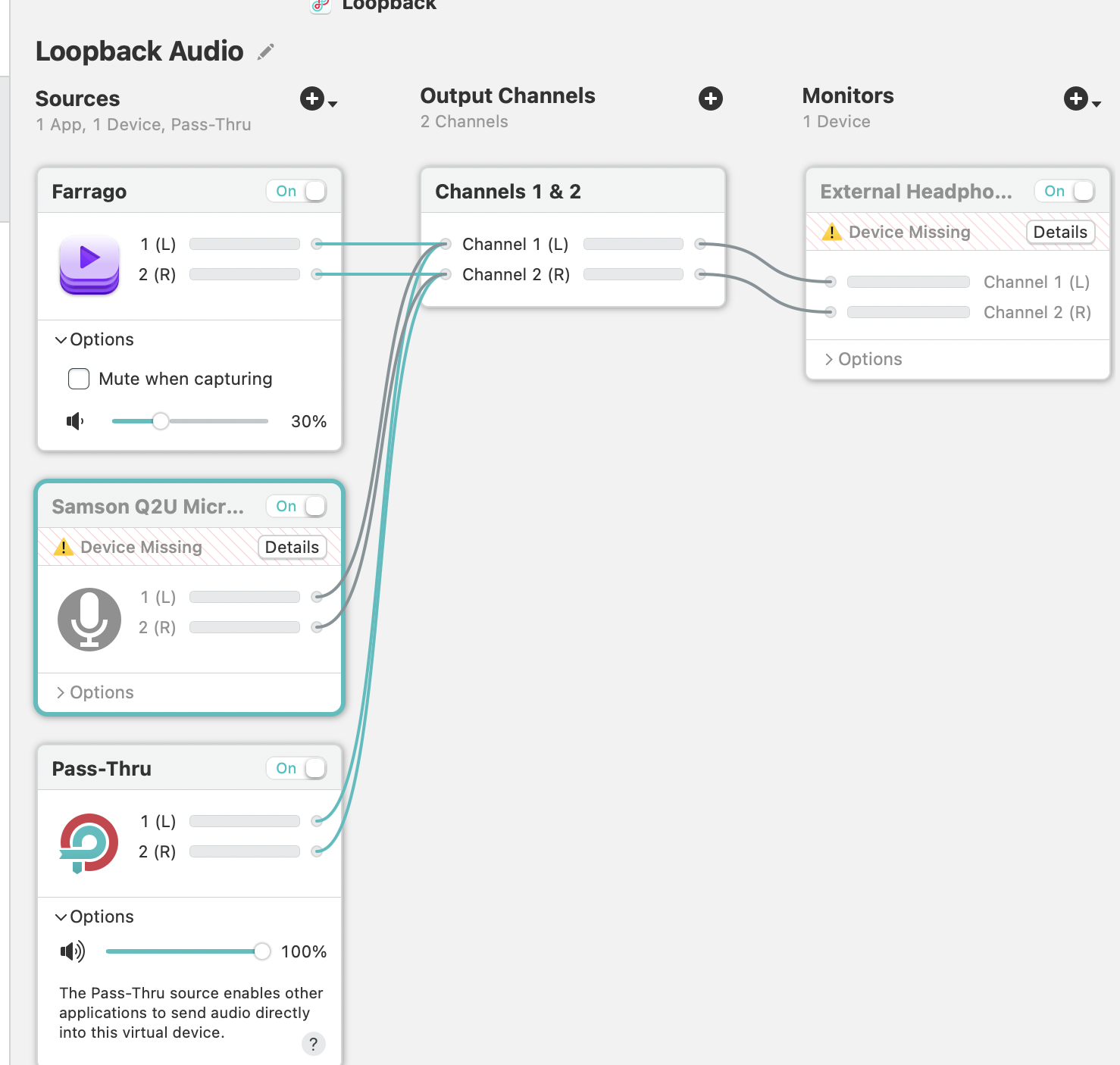
Plug Earbuds into laptop. Open Farrago (sound effects) and Loopback (audio routing). Set Farrago master volume to 40% to avoid clipping.
2.
Open Loopback and set Inputs (on left) as Microphone, Farrago, and Pass Through. Set Monitors to External Headphones.
3.
Go to StreamYard: streamyard.com/xmz2ups7jq
4.
Set Microphone to "Loopback Audio"
5.
Set Output to your headphones
6.
Hit Record
PHASE 2
After Recording
6.
In StreamYard, download the recording as .wav. WAV is uncompressed, so you're editing the highest quality version of your recording.
7.
Open the .wav in Audacity
8.
Trim the start and end
9.
Export as .mp3 (File > Export Audio > MP3, set bit rate mode to Constant, quality to 128kbps, sample rate to 44100 Hz)
10.
Note the file size in bytes (right-click > Get Info on Mac)
11.
Note the duration (shown in Audacity, format as 00:MM:SS)
12.
Upload the .mp3 to Neocities in the episodes/ folder. Name it
episode4.mp3, episode5.mp3, etc.
PHASE 3
Edit the XML Feed
13.
Open: podcast.xml on Neocities
14.
Update lastBuildDate near the top to today's date:
<lastBuildDate>Day, DD Mon YYYY HH:MM:SS -0700</lastBuildDate>
Format example: Sat, 26 Jul 2026 12:00:00 -0700
15.
Add a new <item> block above the existing episodes. Copy this template:
<item>
<title>YOUR EPISODE TITLE</title>
<description>YOUR EPISODE DESCRIPTION</description>
<enclosure url="https://likeobjects.neocities.org/episodes/episodeNUMBER.mp3"
length="FILE_SIZE_IN_BYTES" type="audio/mpeg"/>
<pubDate>Day, DD Mon YYYY HH:MM:SS -0700</pubDate>
<itunes:duration>00:MM:SS</itunes:duration>
<itunes:episode>NUMBER</itunes:episode>
<guid isPermaLink="false">epNUMBER-YYYY-MM-DD</guid>
</item>
Replace the pink parts:
YOUR EPISODE TITLE- episode nameYOUR EPISODE DESCRIPTION- short summaryepisodeNUMBER- match your filename (episode4, episode5...)FILE_SIZE_IN_BYTES- from step 1000:MM:SS- from step 11NUMBER- episode numberYYYY-MM-DD- today's date
16.
Save the XML file
PHASE 4
Edit the HTML Page
17.
Open: index.html on Neocities
18.
Add a new episode card above the existing episodes (right after the "Episodes" label). Copy this template:
<article class="episode-card">
<p class="ep-number">Episode NUMBER</p>
<h2 class="ep-title">YOUR EPISODE TITLE</h2>
<p class="ep-date">Month DD, YYYY</p>
<p class="ep-desc">
YOUR EPISODE DESCRIPTION
</p>
<audio class="ep-player" controls preload="none">
<source src="episodes/episodeNUMBER.mp3" type="audio/mpeg">
Your browser doesn't support audio.
<a href="episodes/episodeNUMBER.mp3">Download it instead.</a>
</audio>
</article>
19.
Save the HTML file
PHASE 5
Test
20.
Visit oopsallmicrophones.neocities.org and confirm the new episode appears
21.
Click play and make sure the audio works
22.
Check the RSS feed: podcast.xml
23.
Validate feed (optional): castfeedvalidator.com
FINAL CHECK